Skip tour controls
A clearer workday, step by step
01 YOUR WORKDAY, IN CONTEXT
Make every workday count.
See your call activity, set meaningful goals, and build the skills and confidence to keep moving forward.
01 See your numbers clearly02 Choose your next goal03 Keep building your skills
ACTUAL WINDOWS APP SCREEN
02 SEE THE WHOLE PICTURE
Turn a busy day into clear insight.
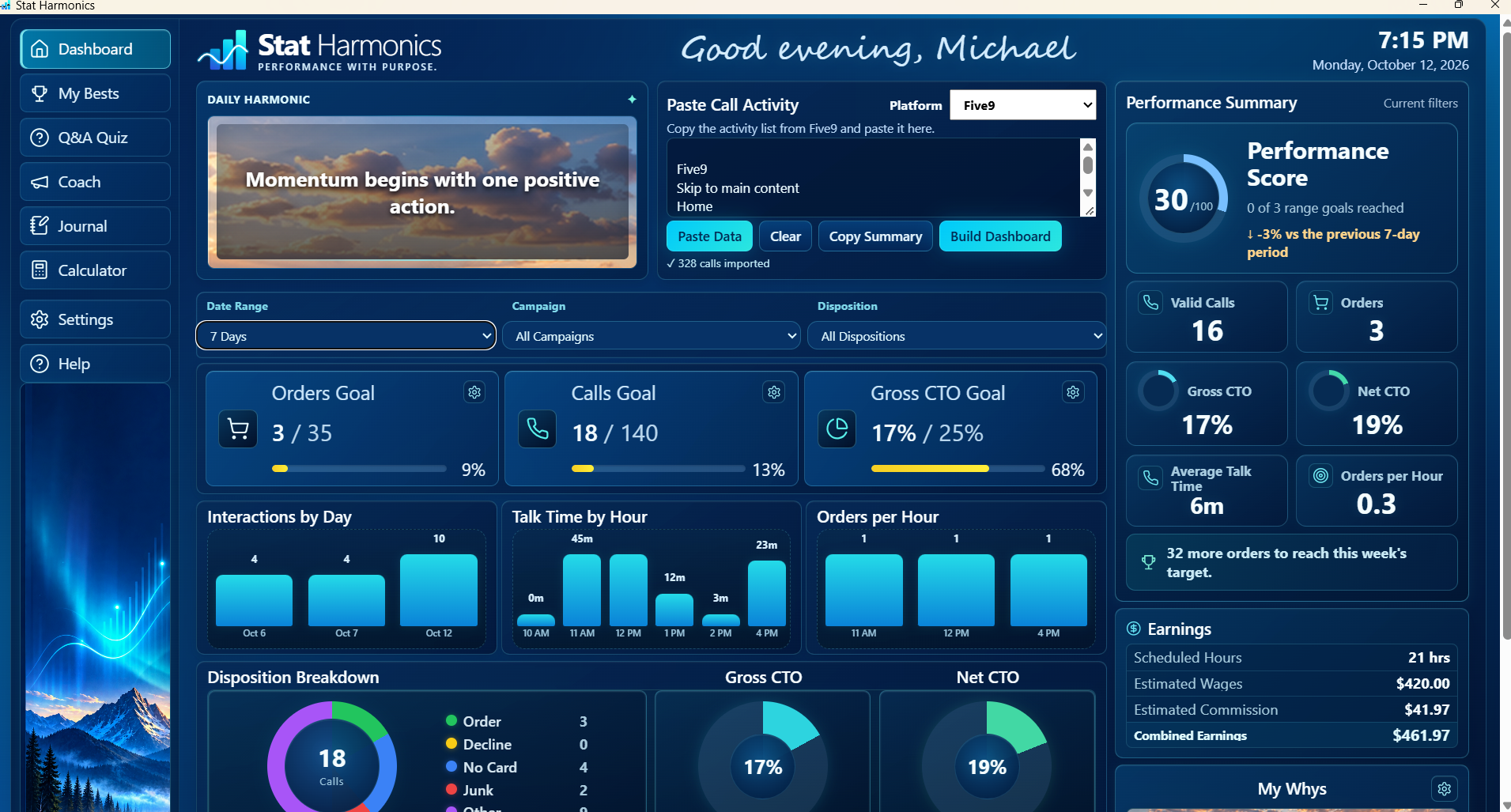
Bring in your call activity to review calls, orders, conversion, talk time, and estimated earnings together in one dashboard.
↗Know where you standReview valid calls and conversion results at a glance.
▤Notice your patternsCompare activity by day and talk time or orders by hour.
◎Keep goals in viewFollow your progress as your workday unfolds.
Your call activity stays in your personal desktop workspace.
ACTUAL WINDOWS APP SCREEN
Stat HarmonicsYour workday
YOUR RESULTSYOUR GOALSYOUR TRENDS
03 SET A DIRECTION
Give your goals a place in your day.
Set targets that matter to you, then check how your activity is moving toward them. Use the numbers to choose what to focus on next.
CallsStay aware of your activity target.
OrdersKeep your next milestone visible.
ConversionTrack the result you’re working toward.
Your dashboard also includes charts for interactions by day, talk time by hour, and orders per hour.
GOAL PROGRESS · ILLUSTRATIVE VIEW
☎Calls GoalDaily target
Progress updates with your activityOrders GoalYour target
See how close you are to your goalGross CTO GoalConversion target
Keep the outcome in view
04 LEARN FROM YOUR OWN RESULTS
Learn from the patterns in your results.
My Bests summarizes your strongest day and hour, plus orders per hour, for the activity and date range you choose.
01Your best daySee which days have brought your strongest results.
02Your best hourNotice when you tend to be at your best.
03Orders per hourUnderstand your pace across the workday.
Results depend on the activity you import and the selected date range.
MY BESTS · ILLUSTRATIVE VIEW
YOUR PERSONAL RECORDSPatterns worth noticing
♜BEST DAYYour strongest day
See how your days compare ✦ Your personal best can point toward a useful next goal.
05 PRACTICE WITH PURPOSE
Build skills one conversation at a time.
Use Q&A Quiz to practice at your own pace. Coach offers prompts for preparation or reflection, and Journal gives you a place to keep useful takeaways.
QPractice with Q&A QuizReinforce useful knowledge and conversation skills at your own pace.
✦Find a next step with CoachUse focused prompts to prepare for a conversation or reflect on how it went.
✎Keep the insight in JournalCapture lessons, questions, and ideas you want to remember.
QUIZ & COACH · ILLUSTRATIVE VIEW
Q&APRACTICE AT YOUR PACE
ILLUSTRATIVE SAMPLE QUESTIONWhat helps you understand a customer's needs?
AAsk a thoughtful follow-up question✓
BAssume you already know
✦ Practice helps turn good habits into natural ones.
✦COACHPause, listen, and stay curious.A simple reminder to carry into your next conversation.↗
06 KEEP YOUR PURPOSE CLOSE
Keep your reason for the work close.
Daily Harmonic offers a brief moment to reset. My Whys keeps your own reminders—people, goals, or milestones—close to your workday.
✦ Pause and reset with Daily Harmonic⌂ Keep personal reminders close✎ A journal for lessons and small wins
A personal workspace for both the numbers and the person behind them.
FEATURE SCENE · ILLUSTRATIVE VIEW
✦ DAILY HARMONIC“Don’t over-think it,”
Take a breath.
MY WHYS✦
Keep the reasons behind your goals where you can see them.
FamilyFuturePurpose
07 YOUR NEXT STEP
See your progress.
Choose what comes next.
Bring performance, goals, skills practice, and motivation into one Windows workspace.
STAT HARMONICS FOR WINDOWS$30One-time purchase · No subscription
✓ Personal performance dashboard✓ Goals, trends, and personal bests✓ Q&A Quiz, Coach, Journal, and more
Secure checkout with Lemon Squeezy
Use your arrow keys to move through the tour